星期四, 5月 07, 2020

How to detect Linux memory leak?

https://blog.xuite.net/antony0604/blog/254546994


最近所參與開發的linux系統發生了,死機的情形. http 還可連入, 但整個動作非常的慢.
在console mode下, 打 top 命令也非常慢才出現, 而看不到任何一支程式吃掉CPU,
但system CPU 佔全部的 80% 以上. 之後再仔細看到memory free剩非常的少(跟剛開機的時侯相比)
故而懷疑是 memory leak 導致的, 於是寫了一支程式去吃記憶體, 複製發生異常時,情形是否一致.
#include <stdio.h>
#include <stdlib.h>
#include <string.h>
void main(){
 printf("this program will eat memory 1M every 10 seconds\n");
 int i = 0;
 while (1){
  i++;
  sleep(10);
  if (i<= 50) {
   char* leak_mem;
   leak_mem = malloc (1024*1024);
   int iValue = i % 256;
   memset(leak_mem,iValue,1024*1024);
   int j=0;
   for ( j=0; j< 1024*1024; j++)
   {
    leak_mem[j] = (iValue+j) % 256;
   }
   printf("%d. eat 1M memory now ... %d %d ~ %d %d \n", i,leak_mem[0],leak_mem[1],leak_mem[1024*1024-2],leak_mem[1024*1024-1]);
  }
 }
 printf("this program exit now \n");
}
由於Linux如果將吃掉記憶的程式砍掉的話, 其記憶體還是會被釋放回來, 故而當吃掉一定程度的記憶體之後, 即開始休息(不要離開程式, 否則會釋放回去). 另外allocate的記憶體須要memset,才會真的使用到.
 可以用來看系統CPU分配的情形, 可以經由top 中的Load average, 其欄位分別記錄著過去時間有多少程式須共用一個CPU, 分別是1/5/15 分鐘. 也可經由下列指令得知 cat /proc/loadavg
另外top也可以有不同的排序方式 N/M/P/T (show CPU usage, sort by pid/mem/cpu/time) . 而top 也能看到記憶使用的仔細情形 ( S: show memory), 可以觀察到VSZ RSS 的使用情形.

想要得知某一程式有多少執行緒正在執行, 命令如下:
ps -T | grep process-name
如果要得知wis-stream 有多少個執行緒在執行, 則範例如下(除了主程式外還有四個子執行緒):
#
# ps -T | grep wis-stream
 1376 root      56:19 /bin/wis-streamer
 1377 root       0:01 /bin/wis-streamer
 1378 root       0:00 /bin/wis-streamer
 1379 root       0:00 /bin/wis-streamer
 1380 root       0:00 /bin/wis-streamer
15792 root       0:00 grep wis-stream
#
而要查看某一執行緒(pid) , 有執行那些 system call 的指令會特別佔用記憶體, 則用下列命令去查詢:
strace -c -p PidOfThread
strace此會attech 到此pid ,直到你中斷它的執行(Ctrl-C), 如要看上述wis-streamer的情形如下:
# strace -c -p 1376
Process 1376 attached - interrupt to quit
^CProcess 1376 detached
% time     seconds  usecs/call     calls    errors syscall
------ ----------- ----------- --------- --------- ----------------
 97.10    0.220000         280       785           select
  2.90    0.006581           3      2501           gettimeofday
------ ----------- ----------- --------- --------- ----------------
100.00    0.226581                  3286           total
#
可以得知大部分的CPU 都在執行select 這個system call 上面.
那些命令屬於 system call , 可以查詢下列網址  Linux System Call Table

要看記憶體使用的情形, 可以用下列命令:
free -m
cat /proc/meminfo
top (執行之後再按大寫 S)
pidstat -r 10 -p ALL
其中以 pidstat 較好用, 它可以看到所有程式佔用記憶體的情形
# pidstat -r 10 -p ALL
Linux 2.6.38.8 (VN-H228)        11/18/14        _armv6l_        (1 CPU)
11:37:17          PID  minflt/s  majflt/s     VSZ    RSS   %MEM  Command
11:37:28            1      0.00      0.00    3272    700   0.66  linuxrc
11:37:28          823      0.00      0.00    2532    968   0.91  check_daemon
11:37:28          826      0.00      0.00    3784   1164   1.09  syslogd
11:37:28          828      0.00      0.00    3276    660   0.62  logger
11:37:28          830      0.00      0.00   12224   1476   1.39  topbus
11:37:28          837      0.10      0.00   60608   2988   2.81  topservice
11:37:28          842      0.00      0.00    3272    328   0.31  telnetd
11:37:28          843      0.00      0.00    3276    728   0.68  sh
11:37:28          874      0.00      0.00       0      0   0.00  loop0
11:37:28          875      0.00      0.00       0      0   0.00  ext4-dio-unwrit
11:37:28          943      0.00      0.00       0      0   0.00  dsplogd
11:37:28          944      0.00      0.00       0      0   0.00  vsyncd
11:37:28          958      0.00      0.00       0      0   0.00  hdmid
11:37:28          967      0.00      0.00  279680   1324   1.24  capture_server
11:37:28          979      0.00      0.00  164904   1056   0.99  encode_server
11:37:28          982      0.00      0.00   69304   1704   1.60  tv_3a_service
11:37:28          989      0.00      0.00   30872   3992   3.75  jackd
11:37:28         1028      0.00      0.00   18716    800   0.75  check_auth
11:37:28         1033      0.00      0.00    2300    672   0.63  detection
11:37:28         1036      0.00      0.00    2676   1128   1.06  fget
11:37:28         1039      0.00      0.00    2292    556   0.52  fset
11:37:28         1041      0.00      0.00   18596    848   0.80  ieee8021x
11:37:28         1104      0.00      0.00    2436    780   0.73  yaweb
11:37:28         1120      0.00      0.00   60444    788   0.74  ftp_service
11:37:28         1122      0.00      0.00   60460    712   0.67  email_service
11:37:28         1124      0.00      0.00   18388    540   0.51  sd_service
11:37:28         1126      0.00      0.00   43256    968   0.91  event_service
11:37:28         1155      0.00      0.00   30128   1136   1.07  subscriberman
11:37:28         1157      0.10      0.00   26668    760   0.71  tv_wsdiscovery
11:37:28         1159      0.00      0.00    1868    412   0.39  dbgsvr
11:37:28         1161      0.00      0.00   18392    620   0.58  FocusAssist
11:37:28         1163      0.00      0.00   18396    620   0.58  alarmserver
11:37:28         1169      0.00      0.00   18428    564   0.53  scan_port
11:37:28         1171      0.00      0.00   48360   2324   2.18  audio_server
11:37:28         1173      0.00      0.00   23780   2180   2.05  jvc_audio_clien
11:37:28         1175      0.00      0.00   40176   2212   2.08  audio_read
11:37:28         1204      0.00      0.00   21800    492   0.46  subscriberman
11:37:28         1213      0.00      0.00   18500    664   0.62  jvc_search
11:37:28         1234      0.00      0.00   18500    664   0.62  jvc_search
11:37:28         1246      0.29      0.00   12072   4008   3.77  upnpd
11:37:28         1272      0.00      0.00   43020    796   0.75  rtsp_client
11:37:28         1281      0.00      0.00   10204    624   0.59  ipfinder
11:37:28         1316      0.00      0.00   24604   4176   3.92  snmpd
11:37:28         1376      0.00      0.00   93700   1828   1.72  wis-streamer
11:37:28         1619      0.00      0.00    5736   2032   1.91  lighttpd
11:37:28         1660      0.00      0.00   79444   1972   1.85  rtsp_over_http
11:37:28         1774      0.00      0.00   82516   1808   1.70  rtsp_over_http
11:37:28         6321      0.00      0.00       0      0   0.00  kworker/0:0
11:37:28         7513      0.00      0.00       0      0   0.00  kworker/0:4
11:37:28        15898      0.00      0.00       0      0   0.00  flush-ubifs_0_0
11:37:28        15899      0.00      0.00       0      0   0.00  flush-7:0
如果有那支程式的RSS欄位一直在增長, 則表示此程序有可能是造成memory leak的元凶.此處不能光看VSZ欄位, 因為VSZ 有可能只是allocate memory, 但並沒有真的使用它.
而RSS欄位的增長有時是因為使用到ShareMemory的關後, 所以要配合看free memory是否有減少, 才能正確判斷是否一直吃記憶體.
PS 2019/6/18: 如果採用ram拿來當linux aufs , 則檔案一直寫入增大的話, 會導致memory cache一直增大; 最後可用的記憶體會被吃光而當機. 所以不能有任何程式一直讓檔案變大.
另外, 試了 valgrind , 可以用來偵測 memory leak的問題. 但由於ld-uClibc-0.9.33.2.so 是stripped, 所以cross-compile之後無法有效偵測memory.
d-uClibc-0.9.33.2.so: ELF 32-bit LSB shared object, ARM, EABI5 version 1 (SYSV), dynamically linked, stripped
2 - 不要使用完全剝離的Linux發行版/lib/ld.so。(比如上面的getoff-arm-linux 就連結了 /lib/ld-uClibc.so.0, 那就要求我們的開發板根目錄下的/lib/ld-uClibc.so.0 必須是 not stripped)
refernce of valgrind as follow:

星期二, 5月 05, 2020

DBUS


sd-bus

  1. http://0pointer.net/blog/the-new-sd-bus-api-of-systemd.html
  2. https://bryceknowhow.blogspot.com/2017/09/linux-ubuntuinter-process-communication.html

libdbus
gdbus:


Performance:

星期五, 4月 17, 2020

gstreamer H264 rtmp

gstreamer读取USB摄像头H264帧并用rtmp推流


relay server

  1. rtsp-relay
  2. rtsp-simple-server
  3. rtsp-simple-server binary


experimental:

  1. relay:
    1.  ./rtsp-simple-server&
  2. source:
    1.  ./ffmpeg -re -stream_loop -1 -i "../608798609.972728.mp4" -codec copy -f rtsp rtsp://10.1.59.111:8554/mystream&
  3. broker:
    1. ./ffmpeg -rtsp_transport tcp -i rtsp://10.1.59.111:8554/mystream -codec copy -f rtsp rtsp://@10.1.59.111:8554/test


Reference:

星期四, 4月 09, 2020

[Linux] 計算程式運行的最低需求(Code size & Shared libraries) @ Ubuntu 12.04


[Linux] 計算程式運行的最低需求(Code size & Shared libraries) @ Ubuntu 12.04

新版部落格:blog.changyy.org

git clone https://github.com/changyy/resource-calculator.git
$ ./resource-calculator/resource-calculator.sh
Usage> ./resource-calculator.sh -v -r path_bin_readelf -s path_bin_strip -o output_dir -l path_for_library_finding  [ BIN_FILE | BIN_DIR | LIB_FILE | LIB_DIR ] ...
其中 -r 是吃 readelf 工具位置,可以用 -r `which armv6-linux-gnueabi-readelf`;-s 是指定 strip 位置,也就是產出時順便 strip 一下;-o 則是輸出到指定輸出目錄;-l 是指定讀取 shared library 位置,如 cross compiler 的 library 位置、platform sysroot/lib 位置和第三方 shared library 位置等;最後的參數則是要驗證的 tool 或 library ,若接目錄則是進去撈 bin 或 so 出來。
實例 (已在 PATH 環境變數中加入 cross compiler 的搜尋位置):
$ ./resource-calculator/resource-calculator.sh -o /tmp/output -r `which armv6-linux-gnueabi-readelf` -s `which armv6-linux-gnueabi-strip` -l /path/armv6-linux-gnueabi/compiler/lib -l /path/armv6-linux-gnueabi/platform/sysroot/lib -l /path/armv6-linux-gnueabi/3rd-party/lib /path/imagemagick-convert

[INFO] READELF: /path/armv6-linux-gnueabi-readelf
[INFO] STRIP: /path/armv6-linux-gnueabi-strip
[INFO] OTHER LIB: /path/armv6-linux-gnueabi/compiler/lib /path/armv6-linux-gnueabi/platform/sysroot/lib /path/armv6-linux-gnueabi/3rd-party/lib
[INFO] TARGET: /path/imagemagick-convert
[INFO] OUTPUT: /tmp/output/lib /tmp/output/bin /tmp/output/slib
-------------
..............*...............*
All:
       libdl.so.2 libm.so.6 librt.so.1 libpthread.so.0 libMagickWand-6.Q8.so.1 libgcc_s.so.1 libjpeg.so.62 libpng10.so.0 libtiff.so.5 libz.so.1 libMagickCore-6.Q8.so.1 libc.so.6 ld-linux.so.3 libxml2.so.2 libgomp.so.1

$ du -h /tmp/output/
6.7M    /tmp/output/lib
1.9M    /tmp/output/slib
12K     /tmp/output/bin
8.5M   /tmp/output/

$ ls -R /tmp/output/
/tmp/output/:
bin  lib  slib

/tmp/output/bin:
convert

/tmp/output/lib:
libdl.so.2     libMagickCore-6.Q8.so.1  libtiff.so.5
libgomp.so.1   libMagickWand-6.Q8.so.1  libxml2.so.2
libjpeg.so.62  libpng10.so.0            libz.so.1

/tmp/output/slib:
ld-linux.so.3  libc.so.6  libgcc_s.so.1  libm.so.6  libpthread.so.0  librt.so.1
故程式運行時所需的 size 是 8.5MB ,但其中有 sysroot libraries 為 1.9MB ,所以移植到板子上的程式碼大小 = 8.5MB - 1.9MB。

星期三, 2月 19, 2020

Real Time Streaming Protocol 2.0 (RTSP)


Reference:
  1. draft-ietf-mmusic-rfc2326bis-33
  2. RTSP MUST follow the same guidelines with regards to TLS [RFC5246] usage as specified for HTTP, see [RFC2818].
  3. https://stackoverflow.com/questions/40123596/rtsp-over-ssl-rtsps
    1. ffmpeg -re -i -acodec copy -vcodec copy -f rtsp rtsps://username:password@:443/live/myStream


星期五, 2月 07, 2020

cursor


#include <stdlib.h>
#include <time.h>
#include <unistd.h>
#include <stdio.h>
#include <sys/types.h>
#include <dirent.h>
#include <ctype.h>

int main(int argc, char *argv[])
{
    const char ESC = '\x1b';
    int r, c, np, i;
    time_t x;
    struct tm * now;
    DIR * proc;
    struct dirent * de;

    r = argc > 1 ? atoi(argv[1]) : 1;
    c = argc > 2 ? atoi(argv[2]) : 72;
    while (1) {
        time(& x);
        now = localtime(& x);
        printf("%c7%c[7m", ESC, ESC);
        printf("%c[%d;%dH%02d:%02d:%02d%c[K", ESC, r, c,
            now->tm_hour, now->tm_min, now->tm_sec, ESC);
        printf("%c[%d;%dH%s%c[K", ESC, r+1, c, "jack test" , ESC);
        printf("%c[m%c8", ESC, ESC);
        fflush(stdout);
        usleep(50000);
    }
    return 0;
}


puts("\x1b[2Jerase screen (清除螢幕)");
    puts("\x1b[0;0Hmove cursor (移動游標)");
    puts("\x1b[1mbold (粗體)[m");
    puts("\x1b[4munderline (底線)[m");
    puts("\x1b[5mblink (閃爍)[m");
    puts("\x1b[7mreverse (反白)[m");
    puts("\x1b[36mcyan foreground (青字)[m");
    puts("\x1b[41mred background (紅底)[m");
    // 第一位數字: 3=前景, 4=背景 */
    // 第二位數字: 1=red 2=green 3=yellow 4=blue 5=magenta 6=cyan 7=white
 //   puts("\x1b[1m[4m[5m[7m[36[41meverything (上述全部)[m");


https://www.cyut.edu.tw/~ckhung/b/mi/textmode.php
http://tldp.org/HOWTO/Bash-Prompt-HOWTO/x361.html
https://www.cyut.edu.tw/~ckhung/b/mi/c/sysinfo.c
https://www.cyut.edu.tw/~ckhung/b/mi/vt100_reference_card.txt


Article 248 of comp.terminals:
Newsgroups: comp.terminals
Path: cs.utk.edu!gatech!udel!bogus.sura.net!opusc!usceast!chan
From: chan@ece.scarolina.edu (Simon Chan)
Subject: VT100 Reference Card !! ( if you are looking for....)
Message-ID: <chan.728236678@hertz>
Keywords: vt100 terminal escape codes
Sender: usenet@usceast.cs.scarolina.edu (USENET News System)
Organization: USC  Department of Computer Science
Date: 28 Jan 93 15:57:58 GMT
Lines: 162


Taken from VT100 Programming Reference Card (DIGITAL)

ANSI Compatible Mode

        Cursor Movement Commands
                Cursor up                       ESC [ Pn A
                Cursor down                     ESC [ Pn B
                Cursor forward (right)          ESC [ Pn C
                Cursor backward (left)          ESC [ Pn D
                Direct cursor addressing        ESC [ Pl; Pc H  or
                                                ESC [ Pl; Pc f
                Index                           ESC D
                Next Line                       ESC E
                Reverse index                   ESC M
                Save cursor and attributes      ESC 7
                Restore cursor and attributes   ESC 8
                * Pn = decimal parameter in string of ASCII digits.(default 1)
                * Pl = line number (default 0); Pc = column number (default 0)

        Line Size (Double-Height and Double-Width) Commands
                Change this line to double-height top half      ESC # 3
                Change this line to double-height bottom half   ESC # 4
                Change this line to single-width single-height  ESC # 5
                Change this line to double-width single-height  ESC # 6

        Character Attributes
                ESC [ Ps;Ps;Ps;...,Ps m
                Ps =    0 or None       All Attributes Off
                        1               Bold on
                        4               Underscore on
                        5               Blink on
                        7               Reverse video on
                Any other parameter values are ignored.

        Erasing
                From cursor to end of line              ESC [ K  or ESC [ 0 K
                From beginning of line to cursor        ESC [ 1 K
                Entire line containing cursor           ESC [ 2 K
                From cursor to end of screen            ESC [ J  or ESC [ 0 J
                From beginning of screen to cursor      ESC [ 1 J
                Entire screen                           ESC [ 2 J

        Programmable LEDs
                ESC [ Ps;Ps;...Ps q
                Ps =    0 or None       All LEDs Off
                        1               L1 on
                        2               L2 on
                        3               L3 on
                        4               L4 on
                Any other parameter values are ignored.

        Character Set (G0 and G1 Designators)
                Charactor Set                   G0 Designator   G1 Designator
                United Kingdom (UK)             ESC ( A         ESC ) A
                United States (USASCII)         ESC ( B         ESC ) B
                Special graphics characters     ESC ( 0         ESC ) 0
                 and line drawing set
                Alternate character ROM         ESC ( 1         ESC ) 1
                Alternate character ROM         ESC ( 2         ESC ) 2
                 special graphics characters

        Scrolling Region
                ESC [ Pt ; Pb r
                Pt is the number of the top line of the scrolling region;
                Pb is the number of the bottom line of the scrolling region
                and must be greater than  Pt.
                (The default for Pt is line 1, the default for Pb is the end
                 of the screen)

        TAB stops
                Set tab at current column               ESC H
                Clear tab at curent column              ESC [ g or ESC [ 0 g
                Clear all tabs                          ESC [ 3 g

        Modes
                                  To Set                To Reset
        Mode Name            Mode        Sequence   Mode        Sequence
        Line feed/new line   New line    ESC [20h   Line feed   ESC [20l
        Cursor key mode      Application ESC [?1h   Cursor      ESC [?l
        ANSI/VT52 mode       ANSI        N/A        VT52        ESC [?2l
        Column mode          132 Col     ESC [?3h   80 Col      ESC [?3l
        Scrolling mode       Smooth      ESC [?4h   Jump        ESC [?4l
        Screen mode          Reverse     ESC [?5h   Normal      ESC [?5l
        Origin mode          Relative    ESC [?6h   Absolute    ESC [?6l
        Wraparound           On          ESC [?7h   Off         ESC [?7l
        Auto repeat          On          ESC [?8h   Off         ESC [?8l
        Interlace            On          ESC [?9h   Off         ESC [?9l
        Graphic proc. option On          ESC 1      Off         ESC 2
        Keypad mode          Application ESC =      Numeric     ESC >

        Reports
                Cursor Position Report
                Invoked by                      ESC [ 6 n
                Response is                     ESC [ Pl; Pc R
                * Pl = line number; Pc = column number

        Status Report
                Invoked by                      ESC [ 5 n
                Response is                     ESC [ 0 n  (terminal ok)
                                                ESC [ 3 n  (terminal not ok)

        What Are You
                Invoked by                      ESC [ c  or  ESC [ O c
                Response is                     ESC [ ?1 ; Ps C
                Ps =    0       Base VT100, no options
                        1       Processor option (STP)
                        2       Advanced Video option (AVO)
                        3       AVO and STP
                        4       Graphocs processor option (GO)
                        5       GO and STP
                        6       GO and AVO
                        7       GO, STP, and AVO
        Alternately invoked by ESC Z (not recommended.) Response is the same.

        Reset
                ESC c

        Confidence Tests
        Fill Screen with "Es"           ESC # 8
        Invoke Test(s)                  ESC [ 2 ; Ps y
        Ps =    1                               Power-up self test
                                                (ROM checksum, RAM, NVR,
                                                keyboard and AVO if installed)
                2(loop back connector required) Data Loop Back
                4(loop back connector required) ETA Modern Control Test
                8                               Repeat selected test(s)
                                                indefinitely
                                                (until failure or power off)

VT52 Compatible Mode
        Cursor Up                               ESC A
        Cursor Down                             ESC B
        Cursor Right                            ESC C
        Cursor Left                             ESC D
        Select Special Graphics character set   ESC F
        Select ASCII character set              ESC G
        Cursor to home                          ESC H
        Reverse line feed                       ESC I
        Erase to end of screen                  ESC J
        Erase to end of line                    ESC K
        Direct cursor address                   ESC Ylc         (see note 1)
        Identify                                ESC Z           (see note 2)
        Enter alternate keypad mode             ESC =
        Exit alternate keypad mode              ESC >
        Enter ANSI mode                         ESC <

        NOTE 1: Line and column numbers for direct cursor address are single
                character codes whose values are the desired number plus
                37 (in Octal). Line and column numbers start at 1.
        NOTE 2: Response to ESC Z is ESC / Z.


-=-=-=-=-=-=-=-=-=-=-=-=-=-=-=-=-=-=-=-=-=-=-=-=-=-=-=-=-=-=-=-=-=-=-=-=-=-=-=-
Simon Chan                                      chan@ece.scarolina.edu
Department of Electrical & Computer Engineering
Swearingen Engineering Centre
University of South Carolina
Coulmbia, South Carolina 29208
-=-=-=-=-=-=-=-=-=-=-=-=-=-=-=-=-=-=-=-=-=-=-=-=-=-=-=-=-=-=-=-=-=-=-=-=-=-=-=-


Article 269 of comp.terminals:
Path: cs.utk.edu!gatech!news.ans.net!cmcl2!adm!smoke!gwyn
From: gwyn@smoke.brl.mil (Doug Gwyn)
Newsgroups: comp.terminals
Subject: Re: VT100 Reference Card !!
Keywords: vt100 terminal escape codes
Message-ID: <19629@smoke.brl.mil>
Date: 1 Feb 93 15:01:49 GMT
References: <chan.728236678@hertz>
Organization: U.S. Army Ballistic Research Lab, APG MD.
Lines: 25

In article <chan.728236678@hertz> chan@ece.scarolina.edu (Simon Chan) writes:
>Taken from VT100 Programming Reference Card (DIGITAL)

Note that EK-VT100-RC-001 contains several errors and omissions.
The errors appear to all be fixed in the posted version.
Here are some additions:

        Parameters to Direct cursor addressing can be omitted if 1.
        "Index" is broken if NEWLINE is enabled (set-up).
        "Reverse index" scrolls up retaining the same column.

        CHARACTER SET DESIGNATORS: G0 = Shift-In, G1 = Shift-Out

>       ANSI/VT52 mode       ANSI        N/A        VT52        ESC [?2l
        ANSI/VT52 mode       ANSI        ESC <      VT52        ESC [?2l
        Modes can be combined using ";", for example "ESC [ ? 3 ; 4 ; 7 h"

        CONFIDENCE TESTS: Parameter bits are summed into one parameter.

        Hardcopy                ESC # 7
        Graphic processor ON    ESC 1
        Graphic processor OFF   ESC 2

The reference card showed incorrect graphics for octal code 140; its
correct graphic is ` (accent grave).


星期一, 1月 20, 2020

Makefile中wildcard notdir patsubst使用方法

https://blog.xuite.net/auster.lai/twblog/520512252-%5BLinux%5D+Makefile%E4%B8%ADwildcard+notdir+patsubst%E4%BD%BF%E7%94%A8%E6%96%B9%E6%B3%95+


1、wildcard : 擴展通配符
2、notdir : 去除路徑
3、patsubst :替換通配符

例子:
建立一個測試目錄,在測試目錄下建立一個名為sub的子目錄
$ mkdir test
$ cd test
$ vi sa.c
$ vi sb.c

$ mkdir sub
$ cd sub
$ vi sa.c
$ vi sb.c

在test下,建立a.c和b.c 2個文件,在sub目錄下,建立sa.c和sb.c 2個文件

建立一個簡單的makefile
src=$(wildcard *.c ./sub/*.c)
dir=$(notdir $(src))
obj=$(patsubst %.c,%.o,$(dir) )

all:
 @echo $(src)
 @echo $(dir)
 @echo $(obj)
 @echo "end"
 
執行結果分析:
make all

第一行輸出:
a.c b.c ./sub/sa.c ./sub/sb.c

wildcard把 指定目錄 ./ 和 ./sub/ 下的所有尾碼是c的檔全部展開。

第二行輸出:
a.c b.c sa.c sb.c
notdir把展開的檔去除掉路徑資訊

第三行輸出:
a.o b.o sa.o sb.o

在$(patsubst %.c,%.o,$(dir) )中,patsubst把$(dir)中的變數符合尾碼是.c的全部替換成.o,
任何輸出。
或者可以使用
obj=$(dir:%.c=%.o)
效果也是一樣的。

這裏用到makefile裏的替換引用規則,即用您指定的變數替換另一個變數。
它的標準格式是
$(var:a=b) 或 ${var:a=b}
它的含義是把變數var中的每一個值結尾用b替換掉a

星期五, 12月 06, 2019

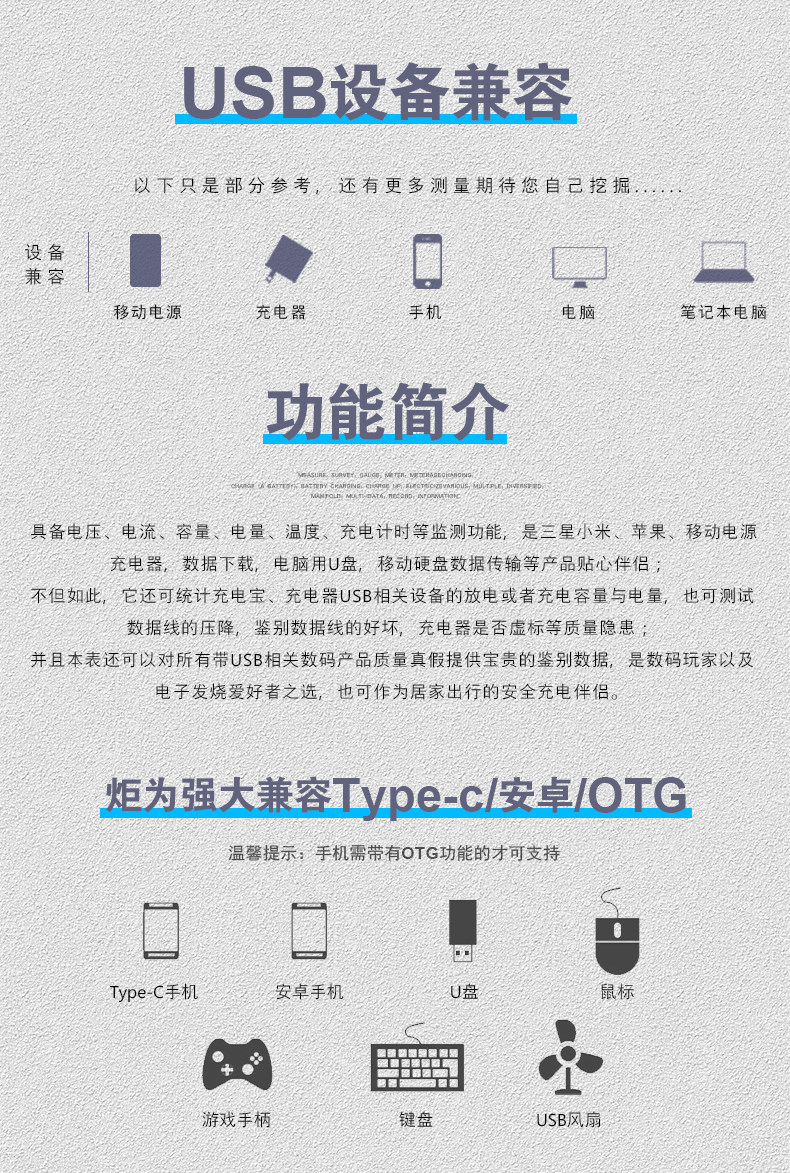
炬为Type-C PD多功能usb测试仪充电器检测仪直流数显电压表电流表

炬为Type-C PD多功能usb测试仪充电器检测仪直流数显电压表电流表

Type-c PD双向电流 一屏多数据显示 USB多口

彩屏版的是USB3.0的接口 ,USB3.0的接口比黑白屏USB2.0的区别是USB3.0支持更多的快充协议比如华为的10V4A和OPPO的闪充等超级闪充,向下兼容USB2.0的QC2.0、QC3.0、MTK快充等 彩屏版还新增三个功能(Type-c双向电流显示,屏保和屏幕翻转 ),不过都带有Type-c 接口 都支持PD3.0 PD3.0的快充协议,彩屏和黑白屏价格只相差2元 推荐购买彩屏版本 性价比比较高。关于U3.O兼容U2.0接口的温馨提示: 如果插入的USB母座不是蓝色的表示为USB2.0,而本表此次采用的A公USB3.0的兼容接口,如果要插到2.0接口,有极少数的需要稍微拔出来少少就能牢固接触,如果是插入相吻合的蓝色USB3.0接口,接触会很稳定。
温馨提示:不带蓝牙功能的版本不可联手机APP进行测量使用,带蓝牙版本请扫描随机配备的二维码下载手机APP软件和链接说明等资料。

炬为十字彩屏表再次6大升级,加量不加价!-推荐选购我司最新款的彩屏版本

升级1:创新双向电流测量, 输入输出顺用反用都正常测量显示电流值,提高方便性
升级2:增加屏幕翻转功能,按键长按可让屏幕翻转显示,插在特殊角度时作用大。
升级3:屏保功能 可以在晚上的时候切换到屏保界面,睡觉不受到亮光影响
升级4:支持高通快充QC4.0、3.0、2.0协议直通;支持PD2.0/3.0协议直通快充 
升级5:界面测量内容再增加,调整排版的合理性易用性
升级6:更换一体C口材料,加固C口的焊接工艺,再度提升C口公头输入的稳固性与耐用性
十字彩表升级后的按键操作:短按屏幕切换,长按屏幕翻转,快速双击容量mAH清零,快速三击电流WH清零,快速四击时间清零,快速五击设置充满断电提醒开关和定时充电时长断电提醒设置闪烁,在闪烁设置中双击是加数单击是减数,加数和减数时再长按为连续加数和减数;当短按键到过压低压过流设置界面时,通过快速双击或快速三击是调整数值。

温馨提示:
1.手机APP仅支持安卓(android)5.0版本以上!(暂不支持苹果APP))
2.电脑软件只支持WIN7以上系统!
 
购买十字型仪表限时赠送检测电流负载可1A 2A 3A(用于测试充电器、充电宝好坏)

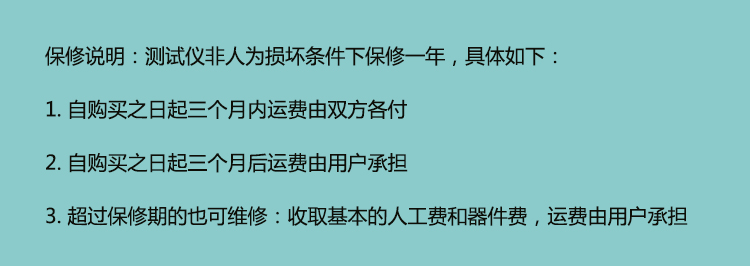
保修说明

保修.jpg

星期三, 9月 18, 2019

星期四, 9月 05, 2019

NMAP 指令,掃 IP,掃 OS,掃 port

掃同網段有那些 IP (用 ping 的)
nmap -sP 192.168.1.0/24
nmap -sP 192.168.1.1-254
掃 OS
nmap -O 192.168.1.1
掃 Port
nmap 192.168.1.1 -p21
全面掃描
NMAP 指令,掃 IP,掃 OS,掃 port
nmap -A -T4 192.168.1.1
只列出網段清單
nmap -sL 192.168.0/24
用 TCP SYN 掃
nmap -sS 192.168.1.1
用 TCP connect 掃
nmap -sT 192.168.1.1
掃 UDP
nmap -sU 192.168.1.1